Video link to tab converter
Paste a video link,
get the tabs
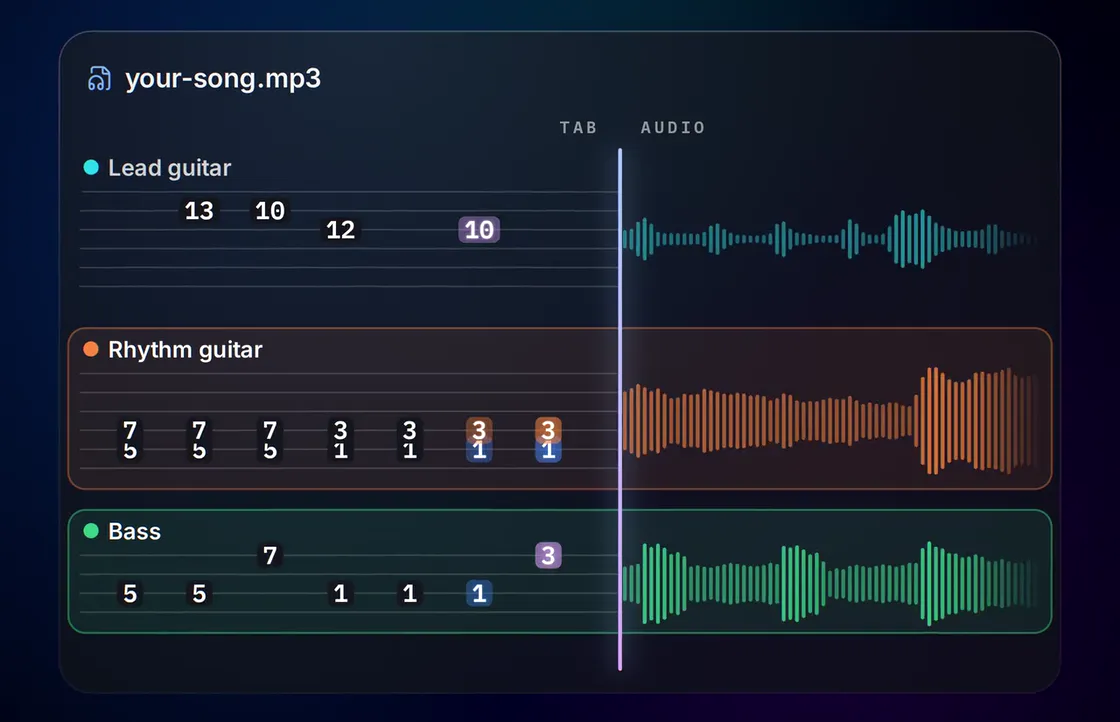
Found the song in a video? Paste the link and NoteNav fetches the audio, then writes the bass, lead guitar and rhythm guitar parts as tab, synced to the recording.
- Bass
- Lead Guitar
- Rhythm Guitar
START WITH A SONG
Create a free preview
No account needed.
Only use media you are authorized to process. By continuing, you agree to the Terms of use.
How it works
From video link to tab
What's in the tab
Every part in the video's soundtrack
NoteNav works from the audio track, so you get the same result as uploading the file: separate bass, lead guitar and rhythm guitar tabs.
Bass
4 stringsThe low end on its own staff: four strings, tuned the way you play, with the line written out note for note.
Audio to bass tabsLead Guitar
6 stringsMelodies, fills and solos: the single-note line that sits on top of the mix, with the fret positions to play it.
Guitar solos to tabsRhythm Guitar
6 stringsThe chords and riffs underneath: the part that carries the song, kept apart from the lead so neither clutters the other.
Rhythm guitar tabsWhy use a link
Skip the download-and-convert step
A lot of music lives in videos: a live session, a lesson, a band's own upload. Pasting the link saves you finding a converter, downloading an audio file and uploading it again.
Only use videos you're authorized to download and transcribe, such as your own recordings or material you have permission to use.
Links that work best
- Use the video's own page link, not a playlist or a live stream.
- Pick the cleanest audio. An official upload usually beats a phone recording from the crowd.
- Check the title and artist before you continue. They feed the tuning suggestion.
Paste and go
One field, one link. NoteNav fetches the audio and fills in the track details for you to check.
A tab for each part
Bass, lead guitar and rhythm guitar each come back as their own tab, as they would from an uploaded file.
Tuning suggestions
The title and artist come from the video, which gives the tuning and capo suggestion something to work with.
Guitar Pro export
Take the finished tab into Guitar Pro as a .gp file with every part on its own track.
Songbook
Try it on a finished song
Open a Songbook track to read the tabs and play along in your browser, then upload a song of your own.




How accurate are the tabs?
Accurate enough to play straight from. NoteNav writes every part note for note, in playable positions for your tuning and capo, and the tab follows the original recording so you can hear each bar against what you're reading. The first 90 seconds of every song are free, so try it on a song you know and compare it with anything else you've tried.
Which videos can I use?
Links to most public video pages work. Live streams, playlists and private or protected videos don't.
Do I need to download the video first?
No. Paste the link and NoteNav fetches the audio itself. If you already have the audio file, uploading it works just as well.
Is there a length limit?
Yes, the same as for uploads. The current limit is shown next to the link field before you continue.
Can I use any video?
Only use videos you are authorized to download and transcribe. The Terms of use cover the details.
What do I get from a video link?
The same as an upload: bass, lead guitar and rhythm guitar tabs for the parts NoteNav finds, synced to the audio, with Guitar Pro export.
Can I try it before paying?
Yes. Every new track starts with a free preview of the first 90 seconds, tabbed and playable against the recording. A full song costs 10 credits.
More ways to start
Other things NoteNav can tab
- MP3 to guitar tabs Upload an MP3 and get lead and rhythm guitar tabs synced to it.
- Audio to bass tabs Turn the bass line in any recording into bass tab.
- MP3 to Guitar Pro Export the finished tabs as a Guitar Pro 7 file.
- Guitar solos to tabs Pull the lead line and solos out of a song as tab.
- Rhythm guitar tabs Get the chords and riffs under the lead as their own tab.
- AI songs to guitar tabs Turn a song from an AI music generator into guitar tabs.
- AI songs to bass tabs Learn the bass line in a song an AI music generator made.
Have the link handy?
Paste it in and check the first 90 seconds of tab for free.