Audio to tab converter
Turn any song into
guitar and bass tabs
Upload an MP3 or paste a video link. NoteNav writes the bass, lead guitar and rhythm guitar as separate tabs, synced to the recording, so you can play along in your browser or export to Guitar Pro.
- Bass
- Lead Guitar
- Rhythm Guitar
START WITH A SONG
Create a free preview
No account needed.
Only use media you are authorized to process. By continuing, you agree to the Terms of use.
How it works
From recording to playable tab in three steps
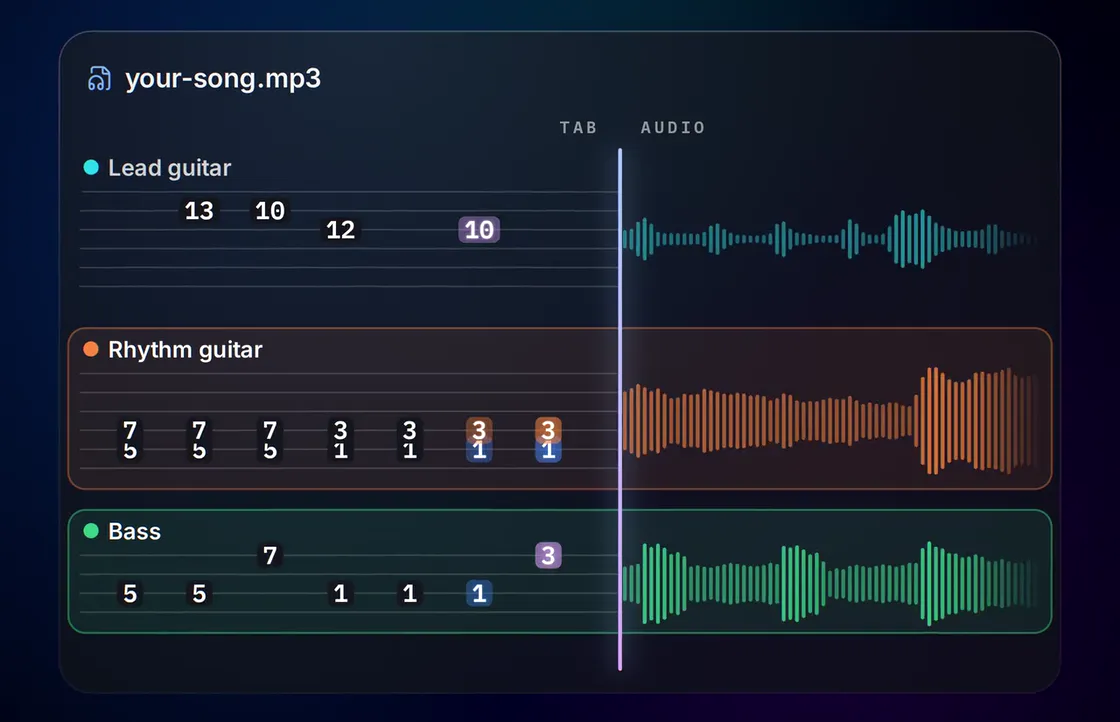
Three parts, one upload
Bass, lead and rhythm, each on its own staff
Most songs stack a bass and two or more guitars on top of each other. NoteNav gives each one its own tab, so the riff you want isn't buried under the solo.
Bass
4 stringsThe low end on its own staff: four strings, tuned the way you play, with the line written out note for note.
Audio to bass tabsLead Guitar
6 stringsMelodies, fills and solos: the single-note line that sits on top of the mix, with the fret positions to play it.
Guitar solos to tabsRhythm Guitar
6 stringsThe chords and riffs underneath: the part that carries the song, kept apart from the lead so neither clutters the other.
Rhythm guitar tabsBuilt for practice
More than a tab to read
The tab is synced to the song it came from. Press play and the cursor follows the real recording, not a MIDI rendition of it, so you hear exactly what you're learning.
When you're ready to play it, the note highway scrolls the part toward you and listens through a mic or audio interface to score each run.
Getting the cleanest tabs
- Use the best copy you have. A lossless WAV or FLAC gives the transcription more to work with than a low-bitrate MP3.
- Fill in the title and artist. NoteNav uses them to suggest a tuning and capo, and you can change either.
- Play through the free preview before you build the whole song.
Synced to the original
The tab player follows the recording you uploaded. Drop it to 0.75× to catch a fast passage without changing the pitch.
Note highway
Play any part on a scrolling 3D highway with chord names, A/B looping and speeds from 25% to 150%.
Scores your playing
Plug in or use a mic. Notes light up as you hit them, and each run ends with a score and your best.
Tunings and capo
Choose from 36 tunings, Drop D and Eb Standard to DADGAD, for each instrument, with a capo on either guitar.
Guitar Pro export
Download a .gp file with bass, lead and rhythm as separate tracks, ready for Guitar Pro.
Desktop app
The optional app for Windows, macOS and Linux uses a native audio engine to cut input delay.
Songbook
Try it on a finished song
Open a Songbook track to read the tabs and play along in your browser, then upload a song of your own.



FAQ
Questions about converting audio to tabs
More answers on the FAQ page, or email [email protected].
How accurate are the tabs?
Accurate enough to play straight from. NoteNav writes every part note for note, in playable positions for your tuning and capo, and the tab follows the original recording so you can hear each bar against what you're reading. The first 90 seconds of every song are free, so try it on a song you know and compare it with anything else you've tried.
Can I convert an MP3 to guitar tabs?
Yes. Upload the MP3 and NoteNav writes lead guitar and rhythm guitar tabs, plus a bass tab, for the parts it finds in the recording. WAV, FLAC, OGG, M4A and AAC files work too.
Which instruments does it transcribe?
Bass, lead guitar and rhythm guitar, each as its own tab. Bass is written for four strings and guitar for six. If a part isn't in the song, NoteNav skips it and builds the rest.
Can I try it before paying?
Yes. Every new track starts with a free preview of the first 90 seconds, tabbed and playable against the recording. A full song costs 10 credits.
Can I open the tabs in Guitar Pro?
Yes. Export a Guitar Pro 7 (.gp) file from the tab player. Each part is a separate track, and the capo you set carries over.
Do I need to install anything?
No. Everything runs in the browser. The desktop app is optional and lowers audio delay when you play along through an audio interface.
More ways to start
Other things NoteNav can tab
- MP3 to guitar tabs Upload an MP3 and get lead and rhythm guitar tabs synced to it.
- Audio to bass tabs Turn the bass line in any recording into bass tab.
- Video link to tabs Paste a link to a video instead of uploading a file.
- MP3 to Guitar Pro Export the finished tabs as a Guitar Pro 7 file.
- Guitar solos to tabs Pull the lead line and solos out of a song as tab.
- Rhythm guitar tabs Get the chords and riffs under the lead as their own tab.
- AI songs to guitar tabs Turn a song from an AI music generator into guitar tabs.
- AI songs to bass tabs Learn the bass line in a song an AI music generator made.
Pick a song. Learn it tonight.
Upload a recording and check the first 90 seconds of tab for free.