MP3 to guitar tab converter
Convert an MP3
to guitar tabs
Drop in an MP3 and NoteNav writes the lead and rhythm guitar parts as tab, synced to the song, with the bass on its own staff. Play along in the browser or take it into Guitar Pro.
- Bass
- Lead Guitar
- Rhythm Guitar
START WITH A SONG
Create a free preview
No account needed.
Only use media you are authorized to process. By continuing, you agree to the Terms of use.
How it works
From MP3 to guitar tab
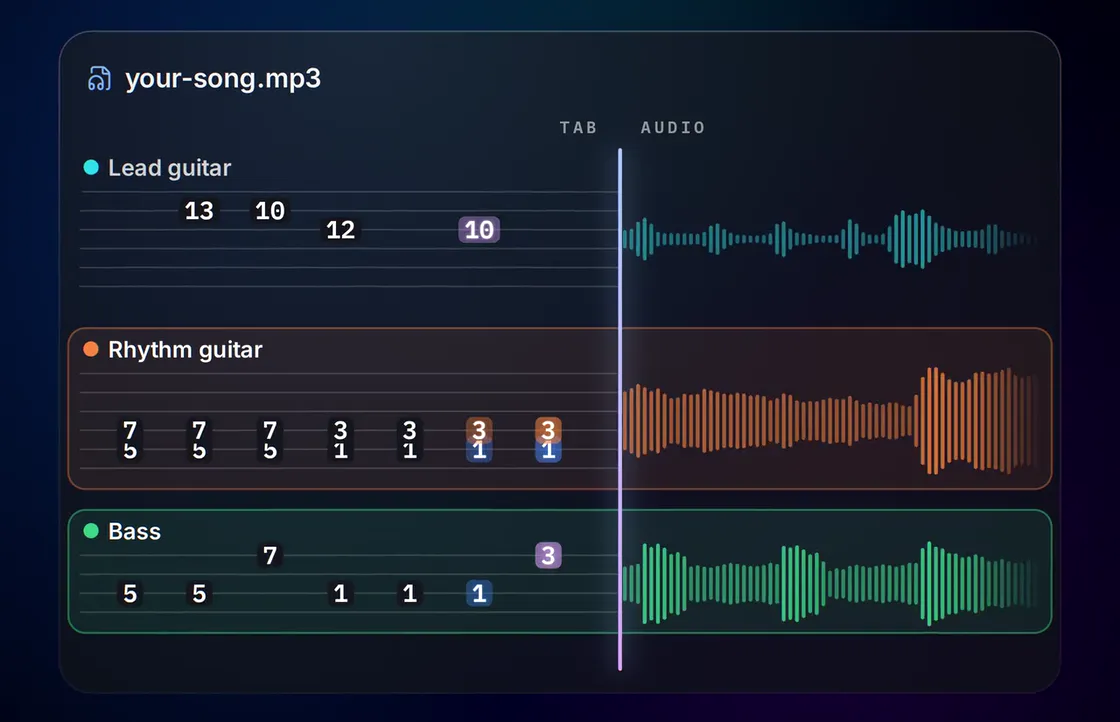
What's in the tab
Lead and rhythm guitar, kept apart
A rock mix often has two or three guitars going at once. NoteNav gives the lead line and the rhythm part separate tabs, and adds the bass because it's in the MP3 anyway.
Bass
4 stringsThe low end on its own staff: four strings, tuned the way you play, with the line written out note for note.
Audio to bass tabsLead Guitar
6 stringsMelodies, fills and solos: the single-note line that sits on top of the mix, with the fret positions to play it.
Guitar solos to tabsRhythm Guitar
6 stringsThe chords and riffs underneath: the part that carries the song, kept apart from the lead so neither clutters the other.
Rhythm guitar tabsWhy an MP3 is enough
Just the finished song
You don't need a MIDI file, a multitrack or a guitar-only recording. Upload the same MP3 you listen to and NoteNav does the rest.
The fret positions follow the tuning and capo you set, and the result is real tab: string and fret numbers you can read, export and play.
Getting a better result from an MP3
- Use the highest bitrate you have. A 320 kbps MP3 beats a 128 kbps one, and WAV or FLAC beats both.
- Pick a studio version over a live recording with crowd noise when you can.
- The preview starts at the top of the file, so trim a long silent intro first if you want it to cover the playing.
One tab per part
Lead guitar, rhythm guitar and bass each get their own tab, so the parts never blur into one.
Written for your tuning
Set the tuning and capo for each guitar before you build. The title and artist give you a suggested starting point.
Follows the MP3
The cursor moves with your MP3, so you hear the exact bar you're reading.
Take it to Guitar Pro
Export a .gp file with lead, rhythm and bass on separate tracks.
Songbook
Try it on a finished song
Open a Songbook track to read the tabs and play along in your browser, then upload a song of your own.



How accurate are the tabs?
Accurate enough to play straight from. NoteNav writes every part note for note, in playable positions for your tuning and capo, and the tab follows the original recording so you can hear each bar against what you're reading. The first 90 seconds of every song are free, so try it on a song you know and compare it with anything else you've tried.
Can I try it before paying?
Yes. Every new track starts with a free preview of the first 90 seconds, tabbed and playable against the recording. A full song costs 10 credits.
Does it work on a full band mix?
Yes. NoteNav is built for finished songs with the whole band playing, not guitar-only recordings.
What if my MP3 has only one guitar?
You get the parts NoteNav finds. If there's no rhythm part, or no bass, that part is skipped and the rest are still built.
Which guitar tunings are supported?
36 presets for six-string guitar, including E Standard, Drop D, Eb Standard, D Standard, Open G and DADGAD, plus a capo from 1 to 12 on either guitar part.
Can I convert other audio formats?
Yes: WAV, FLAC, OGG, M4A and AAC, up to 50 MB. You can also paste a link to a public video instead of uploading a file.
More ways to start
Other things NoteNav can tab
- Audio to bass tabs Turn the bass line in any recording into bass tab.
- Video link to tabs Paste a link to a video instead of uploading a file.
- MP3 to Guitar Pro Export the finished tabs as a Guitar Pro 7 file.
- Guitar solos to tabs Pull the lead line and solos out of a song as tab.
- Rhythm guitar tabs Get the chords and riffs under the lead as their own tab.
- AI songs to guitar tabs Turn a song from an AI music generator into guitar tabs.
- AI songs to bass tabs Learn the bass line in a song an AI music generator made.
Have an MP3 you want to learn?
Upload it and check the first 90 seconds of tab before you spend anything.